Connect is comprised of several services linked together by a series of logs and communication protocols. It is helpful to have a basic understanding of these services to create seamless electronic conversations with your customers.
Connect is accessible using a normal web browser. After you log into the system, you can create campaigns to enable highly sophisticated and individualized, two-way communication with your customers.
Though seemingly simple to use, the application services and information flow are very sophisticated and robust. Below is a high-level overview of the system services and service information flow.
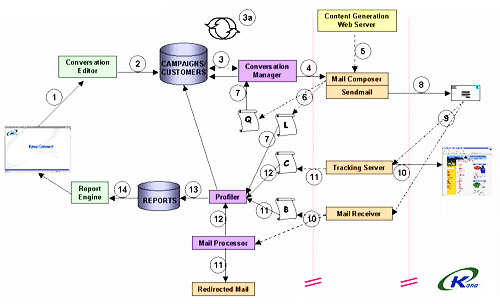
When reading the following information, reference the diagram by matching the number in the list below with the number in the diagram. The two vertical lines on either side of the Mail Receiver (10) are firewalls. This example follows the process of creating a "normal" campaign:
- Create and launch a campaign using the web browser.
- When the campaign is launched, Conversation Editor (CE) informs Connect that the campaign is ready to go.
- The Conversation Manager (CM) regularly examines the database to determine if a
campaign is ready to run.
- When CM determines that a campaign is ready, it enters the Preparation phase identifying the customers in the audience that belong to the appropriate campaign and segment.
- CM builds a list of targeted customers in the database to create the mail object.
- After the Preparation phase, the e-mail is ready for execution. CM pulls other relevant information from the database and packages it into an e-mail object sent to Mail Composer (MC).
- MC assembles the e-mail object by fetching the content from the content web
server. Content can be either text or HTML. Content generator templates can be used
for personalization.
- CM also manages intelligent load balancing for configurations with multiple MCs.
- The system tracks uniqueness and message assembly to ensure no duplicate messages are sent.
- MC creates a log of mail sent, along with a log of the mail content, so individual customer profiles can be updated.
- The two log files are handled as follows:
- One log file is used by CM for updating the customer database, letting the system know an e-mail was sent successfully to a particular person.
- The second log file with more details is used later for reporting purposes. When the message is completely assembled, MC sends it to the mail farm and then to the customer.
- The customer opens the e-mail.
- The customer can perform one of two actions:
- Click an in-message link -- The system captures each click (click-through)
from any e-mail. It knows exactly which customers click which links and
updates the customer profile. Tracking Server (TS) is responsible for
capturing the click-throughs, so 24/7 tracker performance is important. TS
then logs the following for each click:
- The customer who clicked
- The link clicked
- Respond to the e-mail—Replies are received by Mail Receiver (MR). This service must run on a separate machine from the Mail Transfer Agent (MTA). There is special handling for forwarding to customer service and archiving.
- Click an in-message link -- The system captures each click (click-through)
from any e-mail. It knows exactly which customers click which links and
updates the customer profile. Tracking Server (TS) is responsible for
capturing the click-throughs, so 24/7 tracker performance is important. TS
then logs the following for each click:
- MR creates a log file to handle bounces, vacation messages, unsubscribes, or subscribes, all of which are handled automatically by the system. The log file is picked up by Profiler (P) to upload to the customer database.
- MR passes the incoming reply to Mail Processor (MP) to redirect unrecognized e-mails to customer service. Reply-handlers allow keyword scripts to run based on message attributes either in the subject field or body of the incoming reply message.
- Profiler picks up all logs from MC, TS, and MP.
- Profiler updates the information in the customer database and the report database.
- You can retrieve information regarding campaigns, conversations, and customers using the Connect Reports module.