DomainKeys/DomainKeys Identified Mail (DKIM) are cryptographic authentication solutions that add signatures to e-mail messages, allowing recipient sites to verify that the message was sent by an authorized sender and not altered in transit.
DomainKeys
DomainKeys is an e-mail authentication system designed to verify an email sender's DNS domain and the message integrity. DomainKeys is not part of Simple Mail Transfer Protocol (SMTP) routing. It operates on the RFC 2822 message and not the SMTP envelope defined in RFC 2821. For more information about RFC2822 and RFC2821, see Terminology below.
DomainKeys adds a header named DomainKey-Signature that contains a digital signature. The default parameters for the authentication mechanism use SHA-1 as the cryptographic hash and RSA as the public key encryption scheme and encode the encrypted hash using Base64. For more information about SHA-1 and Base64, see Terminology below.
The receiving SMTP server uses the domain name where the mail originated, the string _domainkey and a selector (a selector allows a domain to have more than one public-key in the DNS) from the header to perform a DNS lookup. The returned data includes that domain's public key. The receiver decrypts the hash value in the header field and, at the same time, recalculates the hash value for the received mail body from the point immediately following the DomainKey-Signature header. If the two values match, this cryptographically proves that the mail did originate at the purported domain with no tampering in transit.
DomainKeys can specify to a recipient that an e-mail message from example.net is, indeed, from example.net. It cannot identify whether the e-mail from example.net is spam. The mere presence of a signature does not guarantee whether a message is spam since spammers can and do sign e-mail messages using DomainKeys.
DKIM
DKIM builds on previous work in the form of Domain Keys Identified Mail, Authenticated Sender, Meta-Mail, and so on. DKIM is a mechanism by which e-mail messages are cryptographically signed, permitting a signing domain to claim responsibility for the introduction of a message into the mail stream. The responsible organization adds a digital signature to the message associating it with a domain name for the organization. After an e-mail message is signed, any agent in the message transit path can validate the signature. Message recipients can verify the signature by directly querying the signer's domain to retrieve the appropriate public key to confirm that the message was certified by someone who posseses the private key for the signing domain.
DKIM is compatible with existing DomainKeys (DK) DNS records, meaning a DKIM module does not automatically require additional DNS administration. DKIM enhances the DK DNS key record to permit the addition of several parameters. DKIM uses a different RFC2822 [RFC2822] header named DKIM-Signature for storing the signature to distinguish it from DomainKeys.
Overview of the Feature
Connect provides the ability to enable or disable signing outgoing e-mail messages using DomainKeys/DKIM technology. Connect adds a header named DomainKey-Signature (for DomainKeys) or DKIM-Signature (for DKIM) that contains a digital signature.
Connect Approach to Support DomainKeys/DKIM
Administrators need to configure various receiver domains using Connect. While configuring a receiver domain, Administrators must specify the private key (from the public or private key pair generated by the domain owner) used to sign outgoing e-mail messages. The corresponding public key must be stored in the DNS Server as a TXT record with various defined attributes.
Connect determines whether to sign the outgoing e-mail messages based on various configured parameters and then signs the message accordingly. Connect supports signing outgoing messages with DomainKeys using simple or nofws algorithm and DKIM using simple algorithm. For more information about simple and nofws algorithm, see Terminology below. Connect adds DomainKey-Signature header (in case of DomainKeys) or DKIM-Signature (in case of DKIM) in the outgoing e-mail messages.
The receiving SMTP server queries the DNS server and verifies the digital signature then delivers the e-mail message to the customer's inbox.
The following is an example of a typical DomainKey-Signature header:
 DomainKey-Signature: a=rsa-sha1; s=jun2005.eng; d=example.com;
                [email protected]; c=simple; q=dns;
                b=dzdVyOfAKCdLXdJOc9G2q8LoXSlEniSbav+yuU4zGeeruD00lszZVoG4ZHRNiYzR
- a = The algorithm used to generate the signature. The default is rsa-sha1, an RSA signed SHA1 digest. Signers and verifiers MUST support rsa-sha1.
- b = The signature data, encoded as a Base64 string.
- c = Canonicalization algorithm. Verifiers MUST support simple and nofws. For more information about canonicalization algorithm, see Terminology below.
- d = The domain name of the signing domain.
- q = The query method used to retrieve the public key.
- s = The selector used to form the query for the public key.
As a result, a DNS query is made to:
jun2005.eng._domainkey.example.com
The following is an example of a typical DKIM-Signature header.
 DKIM-Signature: a=rsa-sha1; c=simple/simple; d=connectify-div.com; s=n1024;
                t=1153444845;
                h=From:Reply-To:To:Subject:Date:Message-ID:X-Mailer:Mime-Version:Content-Type;
                b=qwMjKBRwXbvzwE7l6XShbZ7ZMMrZ0sllxJKL4D8FKUmZX5dOphH
Applicability for Mail Farm
The DomainKeys/DKIM compliance is applicable for Connect instances using either Direct Mail Sending (DMS) or Mail Farm. Administrators can always turn off the DomainKeys/DKIM support at the application level, if the Mail Farm is configured to sign outgoing e-mail messages using DomainKeys/DKIM.
Performance Overhead
There is additional overhead involved when DomainKeys/DKIM is used to sign outgoing e-mail messages from Connect.
When using the DomainKeys/DKIM feature, you can do the following:
- Administer receiver domains
- Configure message signing
Administer Receiver Domains
Administrators can configure receiver domains with the appropriate details required to sign e-mail messages. For more details about configuring receiver domains, see Administering Receiver Domains.
Configure Message Signing
Administrators can enable or disable signing at the system parameter level, at the conversation level or at the receiver domain level. For more details about configuring message signing, see Configuring Message Signing.
DomainKeys/DKIM Support - Workflow
The following diagram illustrates the DomainKeys/DKIM workflow.
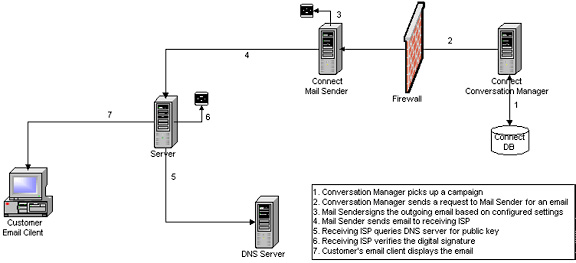
DomainKeys/DKIM Workflow
The following steps describe the DomainKeys/DKIM feature workflow.
- The Conversation Manager picks up a campaign.
- The Conversation Manager requests the Mail Sender to send an e-mail message.
- The Mail Sender signs the outgoing message based on the configured settings and performs.
- Identifies the sender's domain which is located in the From address of the outgoing e-mail message.
- Determines if an e-mail message should be signed.
- Selects a private-key (stored in the database).
- Performs Canonicalization of the e-mail header and body.
- Calculates the signature value.
- Adds the DomainKey-Signature (or DKIM-Signature) header to the outgoing e-mail message.
- The Mail Sender sends the e-mail message.
- The Receiving ISP queries the DNS server for the public key.
- The Receiving ISP verifies the digital signature.
- The e-mail message is delivered to the customer’s inbox.
Terminology
Base 64 - In computing, base64 is a data encoding scheme whereby binary-encoded data is converted to printable ASCII characters. It is defined as a MIME content transfer encoding for use in internet e-mail. The only characters used are the upper- and lower-case Roman alphabet characters (A-Z, a-z), the numerals (0-9), and the "+" and "/" symbols, with the "=" symbol as a special suffix code.
Genrsa - Generates an RSA private key.
Canonicalization - The method used to prepare headers and content for presentation to the signing algorithm.
nofws Algorithm - A canonicalization algorithm (No Folding White Spaces) that tolerates common modifications as white-space replacement and header line re-wrapping.
RFC 2821 - Basic protocol specification for email transport.
RFC 2822 - Standard that describes the syntax for valid email addresses.
SHA-1 - This Secure Hash Algorithm takes a message of less than 264 bits in length and produces a 160-bit message digest designed so that it is computationally very difficult to find a text string that matches a given hash.
Simple Algorithm - A canonicalization algorithm that tolerates almost no modifications.