The Message Summary page gives you a summary of the state of any given message. If there's anything in error with the message segment, message type, status, associated content, and content parameters, the system will let you know on this page. It's also the page from which you'll roll out a message once it's ready to go.
The system will automatically bring you to this page if you click on an existing message name from the Campaign Summary page. If you're creating and staging a new message, you'll get to the Message Summary page when you click the Next arrow on the Message Staging page.
You can also get to this window by clicking the Summary tab.
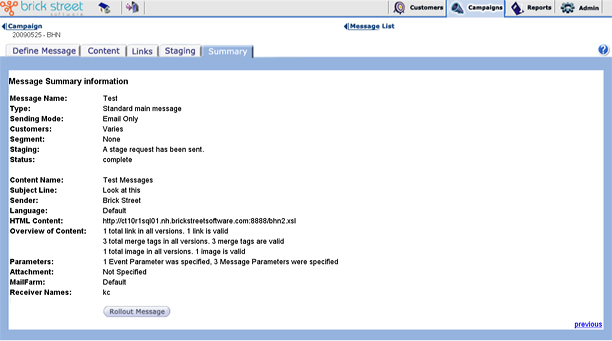
The Message Summary page displays all available information on the selected message. It tells you the message Type, gives you the total number of Customers for the message, identifies the Segment associated with the message, and gives you the staging status and overall status of the message.
The Message Summary page also contains other message content information, including Content Name, Subject Line, the content URLs, and an overview of the message objects (links, merge tags, and images) and Parameters associated with the content.
You can recalculate the number of customers by clicking recalculate.
If you are ready for rollout, click the Rollout Message button.
- Be associated with a conversation and audience model.
- Have a subject and a sender name.
- Have valid links, merge tags, images, and content.
- Be associated with a defined event, if this is an externally-triggered campaign
- Have XML data defined for it (either through external XML or a message parameter), if the message has XSL template content.
- Have a parent message specified if it is a follow-up message.