If you go to the Segmentation Model List page, select Equal Sized Segments Randomly Selected, and click Go, the system will bring you to the Segmentation Model Definition page. This page enables you to define segments based on equally sized random selections of customers.
Using equal sized segments of randomly selected customers separates the audience into segments of relatively equal size. Customers are put into segments randomly and no customer is put into more than one segment. Note that this option is one of the few occasions that you will not have a left-overs segment. Left-overs are not necessary since all customers are assigned to random segments regardless of any filter or attribute criteria.
Do not try to use random sized segments if your audience is smaller than 100. You run the risk of the entire audience falling into the first segment and all subsequent segments being of size 0.
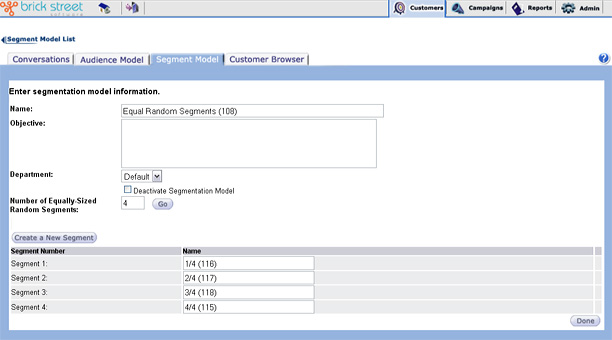
- Entering the Name of the segmentation model. Make the name unique so that you can easily identify this model at a later time from a long list of segmentation models.
- Entering the segmentation model Objectives. The objectives should help anyone who wants to use this model understand what the model is designed to do.
- Selecting the Number of equally sized random segments you want the system to create for this segmentation model and clicking Go to have the system create those segments.
In the lower half of the screen you will see a listing of all the segments that have been created for the chosen model. The system will automatically create two equally sized segments to start. The system will give the segments incremental names. You should rename the segments so they're easy to identify when grouped with segments from other segmentation models on reports.
- Create a new Segment.
- Click the Done button to save the model and return to the Segmentation Model List page.
- Reassign the Number of equally-sized random segments by entering a new number in the field and clicking Go. The segment list will be refreshed to show the new segment set.
Note: You will not be able to perform this function if the segmentation model is locked.
- Rename any individual segment.