Sending Attachments with e-mail
You can link attachments of any file format to your outgoing e-mail in Connect. Each attachment is defined by a URL. In addition to supporting static attachments, Connect also supports dynamic attachments by allowing parameters to be defined for the attachment URLs. When parameters are defined, Connect will fetch a customer-specific URL for each attachment. The files to be attached, or the programs to generate custom attachments, should be deployed in your content server before defining the attachments in the Campaign message.
Defining a message with an attachment
The image below shows Message Content Screen.
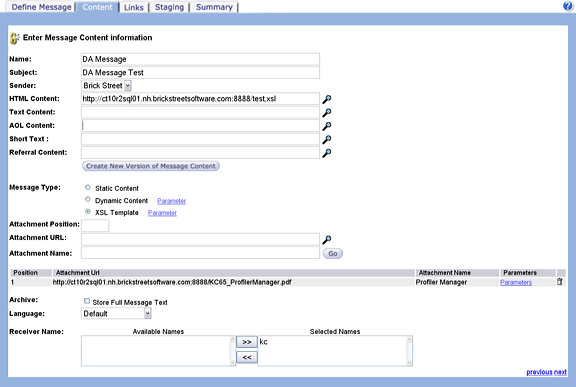
- Setting the Attachment Position field (to a positive number),
- Setting the Attachment URL,
- Setting the Attachment Name (this will be the filename of the attachment in the email message), and
- Clicking the Go button.
The new attachment will appear in the attachment list below the Attachment fields. To create a dynamic attachment, click the Attachment's Parameters link to define URL parameters. Each parameter has a name and a value. The parameter name will be used to construct the URL to fetch the attachment. The parameter value can be any customer attribute.