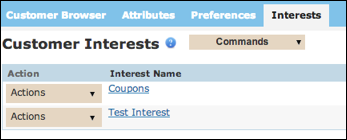
From the Interests screen, you can add a new interest or edit an existing interest.
Create a New Inferred Interest
Follow these directions to create a new inferred interest.
- From the Customers tab Customer Interests screen, click
Commands > New Interest button. The Enter inferred interests
information screen appears.
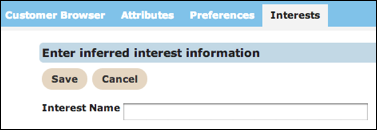
- In the Interest Name field, type a name for the new inferred interest.
- Click Save to save the new interest. The Customer Interest screen appears.
Edit an Inferred Interest
Follow these directions to edit an inferred interest.
- From the Customers tab Customer Interests screen, click Actions > Edit on the row with the interest you want to edit. The Enter inferred interest information screen appears.
- Make your changes.
- Click Save to save your changes. The Customer Interest screen appears.