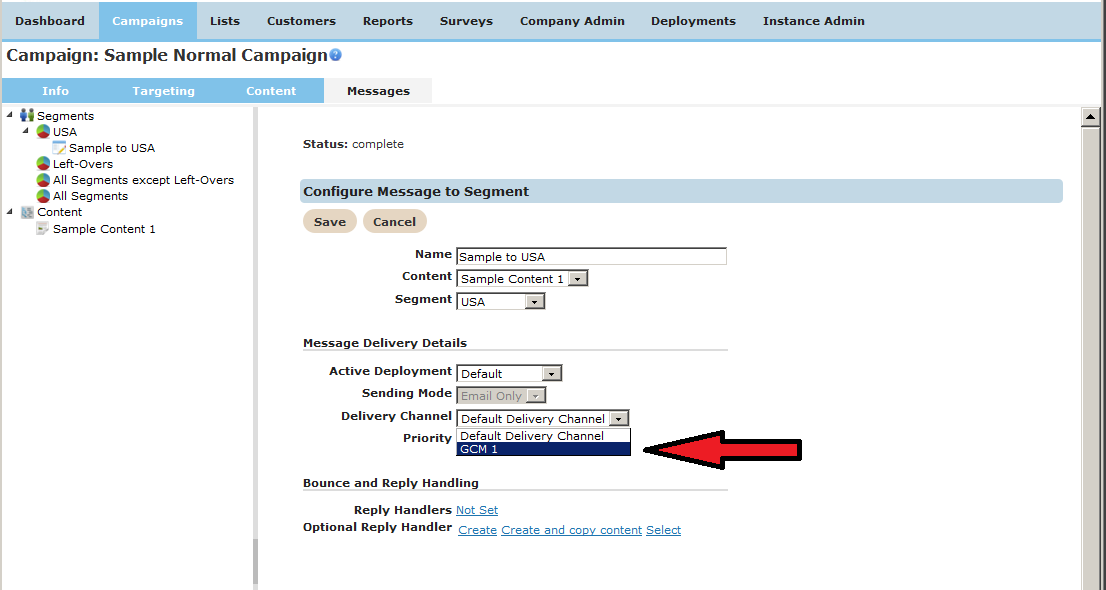
Delivery Channels are specified per-message in the campaign editor. To configure a message for GCM, the sending mode must be “SMS Only” and the Delivery Channel should be the GCM Delivery Channel configured above.
GCM Message Payloads
Connect's GCM Delivery Channel assumes that the content used to create each GCM
message is JSON object. A JSON payload in GCM must contain at least two elements:
- registration_ids - a JSON list containing the Registration ID of the destination.
- data - a JSON array containing the key/value pairs of the message payload.
{
  "registration_ids": ["445865929923"],
  "data": {
    "score": "5x1",
    "time": "15:10"
  }
}
GCM allows additional JSON keywords to be defined to control how the GCM servers handle the message. See the the GCM message documentation for more details.
Configuring GCM Message Content in the CONNECT Campaign Editor
In the message content screen, specify the GCM content as a short text content URL.
Static content or scripted static content URLs may use CONNECT merge tags. Note that
GCM requires the message payload to contain the Registration ID of the destination
device, so if static content is used, it must contain the merge tag of the
Registration ID:
{ "registration_ids": ["<%[Android Registration ID]%>"], ... }
In the fragment above, <%[Android Registration ID]%> is the merge tag for
the customer attribute that contains the GCM Registration ID for the Android device.
Other merge tags may be used in the JSON content as well. For example, if the score and time
values used above were supplied as Event Parameters in an Event-Triggered campaign, they could be used as
merge tags in the static content template shown below:
{
  "registration_ids": ["<%[Android Registration ID]%>"],
  "data": {
    "score": "<%[evnt:Score]%>",
    "time": "<%[evnt:Time]%>"
  }
}
This static content template could be used to produce the sample JSON message shown above.