Connect features an entity called Department in administering Connect users. Connect users who belong to a department will have access restricted only to those conversations and campaigns that belong to that department.
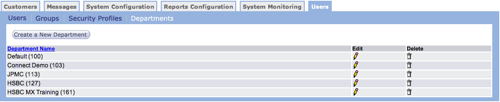
Create New Department
Follow these directions to create a new department.
- From the Users tab Departments screen, click the Create a
New Department button. The Department Name screen appears.

- In the Department Name field, type a descriptive name for the department.
- Click OK to save the new department.
Edit Department
Follow these directions to edit a security profile.
- From the Users tab Departments screen, click the edit icon
 on the row with the
department you want to edit. The Department Name screen appears.
on the row with the
department you want to edit. The Department Name screen appears.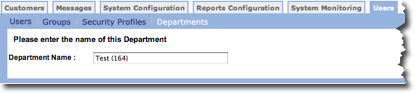
- Make your changes.
- Click OK to save your changes.
Delete Department
Follow these directions to delete a department.
- From the Users tab Departments screen, click the delete icon
 on the row with the
department you want to delete. A confirmation dialog box appears.
on the row with the
department you want to delete. A confirmation dialog box appears. - Click OK in the confirmation dialog box. The department is removed from the list.