The Reply Handlers tab in the Admin Messages window is where you to define and maintain the rules for handling specific types of customer replies.
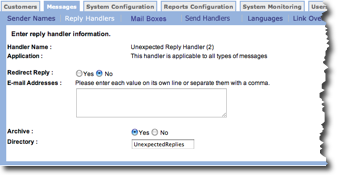
Follow these directions to edit a reply handler.
- From the Messages tab Reply Handlers screen, click the edit icon
 for the handler you want to edit.
The Enter reply handler information screen appears.
for the handler you want to edit.
The Enter reply handler information screen appears. - In the Redirect Reply field, choose whether to redirect a reply email from the customer. If you choose Yes, the Email Addresses field becomes active.
- In the Email Addresses field, type one or more redirect email addresses.
- In the Archive field, choose whether to archive the message. If you choose Yes, the Directory field becomes active.
- In the Directory field, type the archive directory name.
- Click OK to save your changes. The Reply Handlers screen appears.