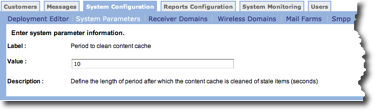
The screen you use to edit the parameter values depends on the parameter you select. At a minimum, the screen displays the parameter label, the value and a description.
Special Considerations
One parameter,PR.ProfileCustomerInterest, enables the system to track customer interest in specific links on your outbound e-mail messages. Because doing this can have a significant impact on system performance, the parameter is set to False by default.
If you want to track customer interest for your message links (for example, you can filter customers according to the percentage of links they clicked in previous messages), you must change the parameter Value to True.
For more information about filtering customers based on message link interest, see either Choose A Filter Type or Enter Parameter Information for a Message.
Edit System Parameter
Follow these directions to edit a parameter.
- From the System Parameter screen, click the edit icon
 for the parameter you want to change.
The Enter system parameter information screen appears.
for the parameter you want to change.
The Enter system parameter information screen appears. - Make your changes.
- Click OK to save your changes. The System Parameter screen appears.