Attributes store information about your customers. Because your business is unique, you define the attributes that best apply to your business.
E-mail Client Types and Gender are pre-defined attributes included in your product installation. There can be other pre-defined attributes in Connect. Contact your System Administrator for assistance if you need help with pre-defined attributes.
Attributes are used to define audience or segment filters in the campaign segmentation model. They are also used to define tracking criteria for reports. The attributes you define are stored in the Attribute Master table and specific attributes can be loaded into the database.
The Attributes screen is the default Customer screen where you can edit existing attributes or create new ones. Click a column name to re-sort the screen.
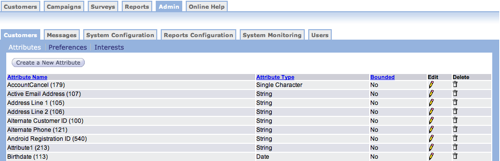
- Attribute Name - Unique name for the attribute.
- Attribute Type - Attribute Types include String, Number, Date, or Single Character.
- Bounded - Each attribute is either bounded or not bounded. An example of a bounded attribute is Age Range, which may be bounded by values such as 19 to 25.
- Edit - Make changes to an attribute.
- Delete - Remove attribute from the list.