A Reply Handler processes e-mails sent to you by customers and either takes a specific action or routes them to designated company e-mail addresses. The Reply Handlers that come with KANA Connect out of the box are capable of recognizing and handling many types of replies including subscribe verifications, unsubscribes, and auto-replies. E-mails that can't be handled automatically by the reply handlers can be routed to customer service.
If a customer has more than 5 persistent bounces within a period greater than 30 days, a reply handler will take them off the subscription list of all conversations. This parameter is configurable in Administrative Tools.
The Active Double Permission Handler (for subscribe campaigns) will automatically subscribe a customer if any reply other than a bounce is received from the customer.
The information you supply here tells the reply handler what functions you expect it to complete.
Changing the current reply handler configuration by either adding or editing reply handlers is more complicated than it appears and can have very unexpected consequences, such as highly degraded performance and mishandling of customer replies. If you are considering adding or editing the current configuration, contact your KANA Consulting Services Representative first.
The Reply Handlers tab in the Admin Messages window enables you to define and maintain the rules for handling specific types of customer replies. You can resort the data in any column by clicking on the column name.
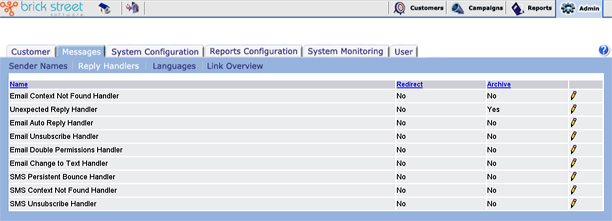
Name: Each Reply Handler has a unique name.
Redirect: This column specifies whether the handler will forward all incoming e-mails to other addresses. If so, you need to enter the e-mail addresses in the next window, Enter Reply Handler Information.
Archive: This column specifies whether the incoming messages are to be archived. If so, you must enter the archive directory name exactly in the Directory field in the next window, Enter Reply Handler Information.
You can view a specific customer's archived messages on the Customer Message History page in the Customer Browser.
Click the edit icon beside any Reply Handler Name you want to make changes to. This will display the Reply Handler Name in the Enter Reply Handler Information window.